Welcome to WordPress. This is your first post. Edit or delete it, then start writing!
Blog
-
Jeju Air flight 2216 Mystery: Why Aircraft Didn’t Slow During Slide on the Runway
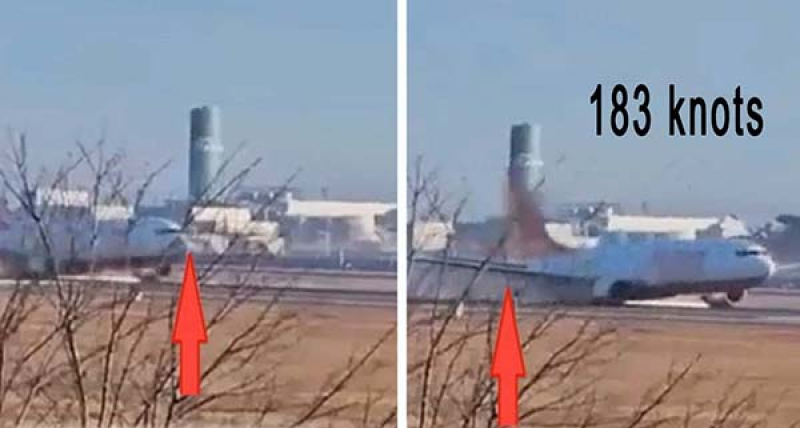 Experts seemed to have missed one critical aspect of the Jeju Air flight 2216 crash video: the aircraft didn’t slow down as it slid along the runway. That video was unlike any I’ve ever seen. I’ve viewed numerous gear up landing videos, and in all cases, those aircraft slowed down relatively quickly after touchdown. But even to the eye, the Jeju Air jet doesn’t appear to slow much it all while it’s on the runway.
Last week, in episode 362 of the Aviation News Talk podcast, I talked about this anomaly, and my analysis of the video to determine the aircraft speed at various points in the video. Since then, we’ve learned that the flight data recorder and cockpit voice recorder didn’t contain the final four minutes of the flight, so much of what we’ll know about the flight will come from a video shot by a restaurant owner.
In accidents, speed is critical. If you’re going to hit something, you want to do it at the slowest possible speed to minimize injuries and deaths. Had flight 2216 slowed normally while it was on the runway, and not gone roaring off the end of the runway, lives could have been saved.
A few days after the accident, I began wondering about the aircraft’s speed as it went off the end of the runway. So I imported the video into video editing software and began examining it frame by frame. That let me estimate the aircraft speed at a number of points along the runway and in the grass overrun. What I found was surprising: Flight 2216 exited the runway at substantially the same speed it was at when it touched down on the runway! During its almost 14 seconds of sliding down the runway on its belly and two engines, it traveled 2/3rd of a nautical mile and yet it was moving at about a constant speed the entire time it was on the runway.
To figure this out, I looked up the length of a Boeing 737-800, and most sources said it’s 129.5 feet long. Then I looked for objects in the video, such as trees, the terminal building and a tower, where you could clearly see both the nose and the tail pass the point. Then I counted the number of video frames between the nose and tail passing each point, to determine how many fractions of a second it took.
The video appears to be shot at 23.98 frames per second. So 12 frames would be half a second. Then it’s easy to calculate the speed at which a 129-foot-long aircraft would have to be moving if, for example, there’s a ½ second time difference between when the nose and the tail pass the same object.
But there is some inaccuracy, probably on the order of +/- 10% in measuring the speed this way. For example, if it took 10 frames for the airplane to pass an object, if it actually passed the object half a frame early or half a frame late, we could be off by as much as 1 frame, which would be 10% of the measurement. So what’s important about the speed numbers I’ll give you is not the absolute number—because it could be off by as much as 10%—but by the trend of the speeds, as the aircraft moved down the runway. And that trend…. is what is surprising.
I made the first measurement at the point where the tail touched the runway, and created a small cloud of smoke. That speed measurement is the least accurate, as it’s the farthest away from the camera and the aircraft is a small target and it’s not perpendicular to the camera. It was the only measurement where it could have reasonably been either 11 or perhaps 12 frames. Adding and subtracting 10% from both of those measurements gives a speed range from 137 to 183 knots, with an average of 160 knots, so let’s say the aircraft first touched down at 160 knots. That of course is very fast for a 737, but you’d expect it to be faster, as the gear and flaps were up.
As the aircraft passed in front of the terminal building, it took 10 frames to pass, which is 183 knots, with an error range of 164 to 201 knots. As it passed the tower, it took 11 frames, which is 167 knots with a range of 150/183 knots. As it passed another tower, it was 10 frames for 183 knots. It then passed a sign in 10 frames, which would be 183 knots. This was probably the most accurate measurement, since the plane was nearly perpendicular to the camera. It then went off the end of the runway, and when it was about a plane length into the grass, it measured 12 frames or 153 knots with an error range of 137 to 168 knots.
So, the numbers bounce around a little bit because of the error in this measurement technique. And while experts commented on the aircraft landing fast, they have missed this point.
I can only think of three reasons why the engines might be high power as the aircraft slid down the runway.
1) Somehow the signals between the thrust levers and the engines were interrupted, and the crew couldn’t bring the engines back to idle.
2) The crew tried to activate the thrust reversers, but instead of providing reverse thrust, they provided forward thrust, and
3) The crew forgot to lower the gear, touched down on the runway…and then decided to try to go around.
And if you’re thinking, that is crazy, no pilot would ever do that. Remember that this aircraft touched down about halfway down the runway at high speed and the pilots could have thought going around would be the best course of action. And believe it or not…if they did, they would not be the first crew to have tried to do that.
On May 22, 2020, Pakistan International Airlines Flight 8303, an Airbus A320, was on a domestic flight from Lahore to Karachi. During its initial landing attempt, the aircraft touched down without the landing gear deployed, resulting in a belly landing that caused significant damage to both engines. The pilots initiated a go-around, successfully got the airliner back into the air, and travelled a few kilometers. But then the damaged engines failed, leading to a crash in a residential area near the airport. 97 of the 99 people on board died, along with one person on the ground.
Toward the end of the video, one can see that the thrust reverser is deployed on the #2 engine. It’s difficult to tell if the #1 engine thrust reverser was deployed. And we don’t know if the pilots tried to deploy the thrust reversers immediately after touchdown, or perhaps much later sometime later during the slide down the runway.
An alternate hypothesis is that the aircraft touched down at high speed, and did decelerate normally as it was sliding down the runway. But the data don’t support that theory. As I mentioned, the least accurate speed measurement was the one when the aircraft first touched down. If the aircraft was at the high end of the error range, it touched down at 183 knots. But the last speed I measured, when the aircraft was still on the very end of the runway was 183 knots, with an error range of 164 to 201 knots. And that measurement should have been the most accurate, since it was directly opposite the camera location. So even if the aircraft touched down at 183 knots, the data show it was still doing 183 knots at the end of the runway, and the only significant deceleration occurred after the aircraft was in the grass.
Many pundits have suggested that the berm at the end of the runway that supported the ILS’s localizer antennas was a key factor in this accident, but I disagree. Speed was the key factor, and speed kills. Even if there had been unlimited grass available, at the speed the aircraft left the runway, it would almost certainly have broken up anyway, though perhaps with less loss of life.
But imagine the possible outcome if, after touchdown, the crew had been able to bring the engines to idle, and the aircraft ran off the runway and hit the berm at 50 knots instead of 150 knots. 150 knots is three times 50 knots, so the energy involved in a crash at 150 knots is going to be nine times higher than it would be at 50 knots, since energy increases by the square of the velocity. That’s tantamount to the difference between a car hitting an object at 90 mph versus 30 mph. Speed kills, and the high speed at which this aircraft exited the runway is what killed nearly everyone on board.
The only way for this aircraft to have exited the runway at essentially the same speed at which it touched down is if the engines were developing high power. Hopefully investigators can figure out why there was so much forward thrust when the aircraft came firing off the end of the runway. We first broke this story on the Aviation News Talk podcast. If you’re not already an Aviation News Talk subscriber, go to aviationnewstalk.com to sign up for the free podcast.
-
Lightspeed Delta Zulu Review
 I talked in #187 of the Aviation News Talk podcast about what you need to know about hearing loss, how hearing loss affects people, and the many ways that pilots and others can permanently damage their hearing. And now there is a new headset that not only helps prevent more hearing loss, but it also provides pilots with a custom sound profile…to compensate for hearing loss you already have. But probably the best feature is that the headset has a built-in carbon monoxide monitor that is always on when the headset is on. I love that because now I don’t have to remember to pull out and turn on my standalone CO monitor when I fly.
The headset is the new Lightspeed Delta Zulu. Lightspeed lent me a demo unit to evaluate, and here’s what I found when I flew with it.
First ANR or automatic noise reduction headsets were introduced about 25 years ago, so the technology is mature. Hence, there’s not a lot of improvement to be had in making headsets quieter, though Lightspeed says the noise reduction is a little better in the Delta Zulu than their prior headsets. So, since there’s not a lot of improvement to be gained in making headsets quieter, Lightspeed chose to add new functions to bring additional value to headset users. And I think they’ve made some savvy choices.
Built-in CO Monitor
First there’s the CO monitor. I talked in #90 of the Aviation News Talk podcast with Mooney pilot Dan Bass, who passed out due to an exhaust system leak that let CO into his cockpit. On his third flight of the day, Dan passed out during the climb with the autopilot on. And when his aircraft eventually ran out of gas, it descended at climb speed and crashed into a snowy field in Minnesota, where Dan woke up in the crashed airplane.Although you can’t see, smell, or taste it, carbon monoxide can make you sick or kill you. The problem is severe enough that the FAA tasked Wichita State University to investigate the problem and solutions.
According to the report, “The FAA standard for CO in an aircraft cabin is no more than 50 ppm [parts per million]; however, there is currently no requirement to monitor for CO in the cabin.”
Wichita State found that “CO was detected on more than 90% of the flights monitored (either on the ground, in the air, or both), [but] the majority of CO events detected were less than 10 ppm…with a very small percentage [of flights] detected with levels above 50 ppm.”Many pilots use a cardboard chemical patch detector that sticks to the instrument panel. These are inexpensive, less than $10, but have drawbacks. First, they don’t detect low levels of carbon monoxide. Tests show that they take a couple of minutes of exposure to high levels of carbon monoxide—in excess of 100 ppm—before turning color. They also need to be replaced every few months, so unless a pilot is diligent about changing them, he or she may get a false sense of security.
You should know that a single backfire, such as when you’re starting the engine, can damage an aircraft’s exhaust system sufficiently to let carbon monoxide into your cabin. So even if your plane is well maintained, and you’ve checked it for CO in the past, you’re only one backfire away from getting CO poisoning.
The new LightSpeed Delta Zulu headset has a built in CO monitor, and it gives you a voice alarm, through the headset, if it measures CO, above certain thresholds. Lightspeed has a new app for the headset, and in that app, you can set the sensitivity for two alerting levels. The default threshold for the caution alert is 50 ppm and for the Warning alert its 100 ppm. Those levels are higher than I would prefer, but in the app, I can set the caution threshold with a slider to any value between 10 and 50 ppm, and the warning threshold to anything between 51 and 100 ppm. The Caution alert message is repeated every 5 minutes, and you can also set how frequently you’d like to get the message from anywhere between 5 and 15 minutes. Typically in the past, using my handheld CO monitor, I sometimes find when an aircraft is first started, I’ll see readings of around 10 ppm, but normally in flight, it drops down to single digit levels.
Lightspeed has had a few dozen of these headsets out in the field during the past few months being tested by pilots, so there haven’t been a lot of flights with the headset. Even so, one of the testers reported a couple of weeks ago that he discovered a CO leak in the plane he was flying because he was wearing the Delta Zulu headset at the time.
The first day I flew with the headset, shortly after we started the engine, the headset said to me “5 ppm” or 5 parts per million. Later it said “6 ppm.” When we got in the air, I checked the app, and it showed we were at 0 ppm, and I didn’t get any other messages from the headset about the CO levels. BTW, the app does have a stats button, which takes you to a graph to view statistics, not just for your current flight, but for prior flights as well, showing the carbon monoxide levels. The graph also shows the cabin temperature.
Built-in Audio Equalizer
Having a headset with a built-in CO monitor would in itself be sufficient to make me want to buy the Delta Zulu. But it also has a built-in equalizer, that Lightspeed calls HearingEQity, that lets you customizes what you hear from the headset, to match any hearing loss you may have.The way you calibrate the headset equalizer is similar to the way an audiologist would give you a hearing test, or would customize the frequency response for a hearing aid you might wear. Essentially, you go to a quiet room, put the headset on and turn it on, and then the app walks you through the test procedure. I did the setup in my bedroom, since its quiet. It probably took me 7 or 8 minutes, but I was taking a lot of time to do it carefully, and you certainly could do it in less time.
To set up the equalizer, turn on the headset, and pair your iPhone with the app. Then touch the equalizer tab at the bottom and then touch the Setup button. The app will then present a 125 Hz tone to one ear, and you’ll need to adjust the volume slider on the app until you just barely hear the tone. You then repeat that for 11 other tones, with the final one being at 12 kHz. That was the only tone I couldn’t hear, since it was such a high frequency, so I left the slider at the maximum volume. The app then runs through all 12 tones for your other ear.
When the setup was completed, the app presents a bar graph showing the amount of gain the Delta Zulu headset will add for each frequency band to attempt to give you normal hearing. My bar graph showed some hearing loss at low and the high frequencies, with mid-range tones being more normal.
When you’re done, the app plays a song you can listen to, and it lets you switch the HearingEQity equalizer on and off, so you can see the difference it makes. As I switched it on and off, I noticed that the song did sound richer, with HearingEQity turned on.
By the way, if you happen to already wear a hearing aid and you like to wear it under your headset when you fly, you can do that. When you Setup HearingEQity, just make sure that you’re wearing you hearing aid when you do the setup.
During my airplane flights, I wanted to see the difference with HearingEQity on and off, and there’s a button on the headset control box you can double push to turn HearingEQity on and off. What I found when listening to controllers was that their voices sounded richer and less tinny. So it actually made listening to the radio a little less irritating. I’m a CFI, and I often fly 4-5 hours or more per day, so anything that makes listening to the radio more pleasant is a welcome change.
Lightspeed Delta Zulu Batteries Swap Quickly
Batteries are often an issue with ANR headsets, but the Delta Zulu has a slick solution that lets you swap batteries much faster than other headsets I’ve seen. The control box, which is inline with the headset cords, has a rechargeable lithium-ion battery that snaps in and out in just a second. Lightspeed says the battery lasts about 30 hours when it’s fully charged. Plus, you can charge the battery in flight with the USB-A cable that Lightspeed provides. Just plug the cable that comes with the headset into a USB port in your aircraft or any portable battery pack. Lightspeed also provides a second battery pack that holds AA batteries. So that is a great backup if the rechargeable battery fails, and you don’t have a USB port for recharging the battery.In the plane after turning the headset on and connecting to the Lightspeed app on my iPhone, I heard through the headset “battery charge full,” which was a comforting a message, as I hate running out of battery power when using an ANR headset.
Delta Zulu Accessory Cables
The headset also includes Bluetooth that enables cell phone connections and streaming of music from your phone or tablet in flight. You can also buy separate cables for connecting to 3.5mm and Lightning port devices if you’d like the additional reliability that a cable provides versus Bluetooth connections. I’ve used a cable like that for years on my existing Zulu 3 headset to stream Facebook Live videos when I’m at lower altitudes and can get cellular data in the plane. The benefit of the cable is that I can narrate the video in real time, and respond to people who are watching the video live.You can also record everything you hear in the cockpit directly to the Lightspeed app. So it will record what you hear on the Comm radios and everything you say and hear over the intercom. I’ve used this many times in the past to record conversations, which I can then share with student pilots I’m flying with.
The Delta Zulu has an Auto shutoff, which saves batteries by turning your headset off after it hasn’t been used for about a minute. I know it works, as the headset turned off a few times as I was playing with it on my desk to learn its features.
Lightspeed Delta Zulu Plug Options
It can be ordered with any of the following connectors. The dual GA plugs, which are the most common headset connectors in GA aircraft, the LEMO connector which is a single round black connector found in many newer aircraft, or the U-174 helicopter connector. The headset also has a 7-year warranty.I’ve been using Lightspeed headsets for about 25 years, and currently own three different models I’ve acquired over the years. Headsets are a very personal choice, because not everyone’s ears are the same, so what feels good to you… may not feel good to someone else. I initially started using Lightspeed headsets, because they didn’t hurt my ears… unlike a competitive model, which made my ears hurt a lot after wearing the headset for just an hour. That particular headset model has long since been replaced by a more comfortable model. Still, I’m sold on Lightspeed for several reasons. I love their tradeup program which helps me preserve the investment in my headset. I started with the Lightspeed 15, traded up to the 20 and later the 25, and then to the Zulu and then the Zulu 3. Getting hundreds of dollars back when you trade in your old headset feels really good. I’ve also had my Lightspeeds serviced a few times, and they’ve always gotten the headsets back to me quickly for no charge. And for years, I’ve been able to record everything I hear in my headset, including the radios and the intercom chatter, using the Lightspeed app on my iPhone.
The Delta Zulu headset sells for $1099, the Lightspeed Zulu 3 which I’ve been using for the last few years, sells for $899, and the Lightspeed Sierra sells for $699. These links take you directly to Lightspeed website, where you can order direct from the company. These are affiliate links, so if use them to go to the Lightspeed website and choose to buy a headset, Lightspeed will pay a small referral fee to support Aviation News Talk. The cost of the headset to you is same, regardless of whether you use these links or not.
Thanks for taking the time to read my review, and if you’re unfamiliar with the Aviation News Talk podcast, you can learn more about it at aviationnewstalk.com and you can find it by searching in any app you use to listen to podcasts.
-
Ten Lessons from Cirrus midair crash with Metroliner over Centennial

Last week, all pilots and passengers miraculously survived a midair crash at Centennial Airport, near Denver, CO. A Cirrus SR22, which was flying a right traffic pattern to runway 17R, hit a Metroliner that was on a long final to runway 17L. The Cirrus, which was flying a shallow, continuous turn from downwind to final, hit the Metroliner slightly from behind and above the aircraft. The Cirrus lost it's nose landing gear as it passed through the top of the Metroliner. The Metroliner landed safely and the Cirrus aircraft landed under it CAPS parachute.
In episode #188 of my Aviation News Talk podcast, I talk with Cirrus Pilot Erik Gundersen, who put together a video that matches the aircraft ground tracks with the tower communications from the two controllers working the parallel runways at Centennial airport. After our conversation, I talk about some of the measurements and calculations I made after I talked with Erik, and how those factor into the accident. At the end, I give ten takeaways that all GA pilots can learn from this accident. You can find Aviation News Talk at: aviationnewstalk.com/blog for iPhone/iPad, or at aviationnewstalk.com/188 for Android and listening on a PC, or wherever you get podcasts.
It was clear from ADS-B data available through multiple sources, that the Cirrus was flying the traffic pattern at speeds at least 50 knots faster than the speeds specified by Cirrus. As Erik and I discussed, Cirrus states in their FOMs that the downwind should be flown at 100 knots, base at 90 knots, and final at 80 knots, and at slightly slower speeds for short field landings. Arguably, this accident would never have happened if the only change the pilot made was that he flew the correct pattern speeds.
Faster speeds require steeper bank angles to maintain the same turn radius. As Erik and I discussed, the faster you go, the larger the turn radius, which means at faster airspeeds, your turns become wider, unless you fly a steeper bank angle. Even at the very high speeds this aircraft was flying, if he had only increased his bank to 30 degrees, he would have actually turned just inside of 17R, the runway he was assigned. But since he was at a shallow bank angle, which I calculated to be about 18 degrees, he grossly overshot the centerlines of both runways.
A few people have suggested the Cirrus pilot was mistakenly headed for 17L. That’s certainly possible, as on numerous occasions, when flying to airports with parallel runways, I’ve had to intervene when a client started heading to the wrong runway. That seems to happen most often when the intended runway is shorter and less prominent than the larger runway to which they are mistakenly heading.
In this case though, it seems unlikely the Cirrus pilot was mistakenly headed for 17L, as he was also vastly overshooting that runway as well. I measured the angle at which the Cirrus pilot intersected the centerline for 17L, and it appears the Cirrus pilot still needed to turn another 56 degrees to be aligned with final. So he was less than halfway through the turn from base to final when he hit the Metroliner. So if he was mistakenly headed for 17L, he was doing a very poor job at lining up with that runway, as he was blowing through that centerline as well.
Here's a summary of my ten takeaways:
1. Fly the correct traffic pattern speeds
2. Faster speeds require steeper bank angles
3. Autopilots don’t bank steeply enough for use in the pattern
4. Get comfortable with 30 degree banks in the pattern
5. Don’t overshoot the final, but if you do, consider going around.
6. Refer to a traffic system to identify pattern traffic
7. If in doubt, start your turn early
8. Use G1000 and Perspective Track Vectors to eliminate overshoot final*
9. Don’t Get Distracted
10. Bring a parachute*If you fly a G1000 or Perspective glass cockpit and are unfamiliar with these features, please buy my G1000 and Perspective book.
There are so many lessons to be learned from this accident, so please listen to this episode of my podcast. If you're unfamiliar with how to listen to podcasts, the easiest way to do it is to download one of our dedicated apps for your phone. Just go to the Apple App Store or the Google Play Store, and search for "Aviation News Talk." Or, click here for the dedicated app for iOS and dedicated app for Android. And podcasts are free, so they'll never cost you anything!
-
Max Trescott’s G3000 and G5000 Glass Cockpit Handbook
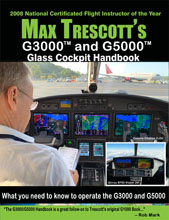 What do some fighter jets, light business jets, turboprops and even Joby Aviation’s eVTOL all have in common? They all use, or plan to use, the Garmin G3000 or G5000 glass cockpit! The Garmin G3000 and G5000 are used in twenty-three aircraft models, and manufacturers have announced plans to use them in a half dozen other models. Now there’s a new source of information for pilots flying these aircraft: Max Trescott's G3000 and G5000 Glass Cockpit Handbook!
Max Trescott, the 2008 National Flight Instructor of the Year, uses a narrative approach to explaining the G3000 and G5000 from a pilot’s perspective in ways that both beginners and experts can understand. He starts by describing the hardware, including the displays and touchscreen controllers, and then describes how to use each function, including the radios, programming flight plans and instrument approaches, and using the autopilot and electronic checklists. He also teaches the data link weather products available through SiriusXM, ADS-B FIS-B weather, and Garmin Connext Weather. Throughout the book, you’ll find practical tips, gleaned from the industry’s most experienced glass cockpit instructors, on how to use different features. Pilots may want to keep a copy of the book in the cockpit and use the book’s detailed Index, so they can quickly look up how to use a feature. The book is 312 pages and includes 367 color images.
The biggest difference between the G3000 and G5000 is the former is designed for smaller and lighter Part 23 aircraft, and the latter is designed to meet the more stringent Part 25 regulations which apply to the design of larger aircraft, including the transport aircraft used by the airlines. Fortunately for pilots, the user interface for the G3000 and G5000 is nearly identical, since the systems share much of the same software code base. The G3000 and G5000’s touchscreen interface leverages many of the user interface concepts used in the Garmin GTN 650 and GTN 750, so pilots using those systems can also benefit from reading the book.
Some of the G3000/G5000-equipped aircraft covered in the book include:
• Cessna Citation M2, CJ3+, Sovereign+, Latitude, Longitude, Denali, and 10+
• Cirrus SF50 Vision Jet
• Daher TBM 930 and TBM 940
• Embraer Phenom EV100 and 300E
• Honda HA-420 HondaJet
• Learjet 70, 75, and 75 Liberty
• Piper M600 and M600 SLS
• retrofitted Cessna Citation Excel and XLS
• retrofitted Beechjet 400A and Hawker 400XP
• retrofitted TacAir F-5 fighter jetsYou can order the book online, or phone 800-247-6553 to order. The price is $44.95. A 30% discount is available for the purchase of three or more of any of Max's books at the same time.
Trescott is the author of the award-winning Max Trescott’s G1000 & Perspective Glass Cockpit Handbook, now in its fifth edition, and Max Trescott's GPS and WAAS Instrument Flying Handbook. He is host of the top-rated Aviation News Talk podcast and a cohost of the Airplane Geeks podcast. He’s based in the S.F. Bay Area and holds four ATP certificates for every airplane category and class and specializes in teaching in Cirrus aircraft.
-
NTSB Report on Kobe Bryant Helicopter Crash
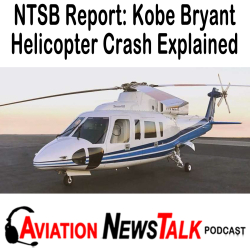 Last week, the NTSB held a 4-hour meeting about the crash that killed Kobe Bryant and eight other people. The Sikorsky S-76 helicopter, operated by Island Express Helicopters, collided with hilly terrain near the city of Calabasas, California. The pilot and eight passengers were fatally injured, and the helicopter was destroyed by impact forces and fire.
In episode #177 of my Aviation News Talk podcast, I play clips from the meeting most relevant for General Aviation Pilots, and at the end I give five takeaways that all GA pilots can learn from this accident. You can find Aviation News Talk at: aviationnewstalk.com/blog for iPhone/iPad, or at aviationnewstalk.com/177 for Android and listening on a PC, or wherever you get podcasts.
The helicopter was not equipped with a flight data or cockpit voice recorder, nor was it required to be. The flight was an on-demand charter operated under the provisions of Part 135 to take the passengers from John Wayne Orange County airport in Santa Ana, California to the Camarillo, California airport for a basketball tournament.
The weather that morning included a widespread area of coastal clouds associated with a Marine layer, a stable humid air mass about one to 2000 feet thick, often characterized by stratus clouds at its top, with the potential for fog formation in some areas below. There were no hazardous conditions such as icing or thunderstorms.
The pilot flying was Island Express' chief pilot, and he had been flying in the area for 10 years and had logged about 8,500 hours. The flight departed at 9:07 and proceeded northwesterly across the Los Angeles metropolitan area at 9:20. The pilot requested to transit the Burbank Class C airspace, but ATC advised him to hold due to traffic. Weather in this area was reported as cloud ceilings, 1,100 feet above ground level with visibility two and a half miles. About 11 minutes later, ATC provided special VFR clearance to proceed through the Burbank and Van Nuys airspace.
Throughout this segment of flight, the helicopter was maintaining an altitude of about 500 feet above ground level, and it proceeded to the West out of the San Fernando Valley area. ATC advised the pilot that they would be too low for flight following, and they should contact Camarillo tower as they got closer. The pilot acknowledged, and the helicopter proceeded to the West following Hwy 101 toward an area of rising terrain at a speed of about 140 knots. About four minutes later, the pilot contacted ATC again and advised them that he was intending to climb to go above the cloud layers. A surveillance camera near Hwy 101 captured the helicopter about this time.
The helicopter had been flying about 350 feet above ground level, but during the transmission to ATC began climbing at a rate of about 1500 feet per minute, generally following the 101 in a slight left turn. During radio communications with ATC, the helicopter climbed through an altitude of 2000 feet above sea level, or about 1300 feet above ground level, by which point it was highly unlikely for the pilot to be able to maintain visual ground contact. The climb reached a maximum altitude of about 2,400 feet above sea level.
As the helicopter continued a left turn diverging from the highway, the controller asked the pilot's intentions, and he said he was climbing to 4,000 feet. However, by that time, the helicopter was in a tightening left turn and descending rapidly. This maneuver is consistent with a pilot experiencing spatial disorientation in limited visibility conditions.
Here are my five key takeaways for GA pilots.
- It doesn’t matter whether you’re a student pilot, private pilot, or instrument rated pilot. If you’re flying VFR, do NOT enter a cloud. Because if you do and lose control and have a crash, as this very high time accident pilot did, you’ll most likely die. I tell all of my student pilots and private pilots to stay out of the clouds…under penalty of death. And by the way there have been many VFR into IMC accidents that have happened to instrument pilots. Having an Instrument rating does help a little, but it doesn’t guarantee you’ll survive if you accidentally blunder into the clouds while flying VFR.
- Know how to use your autopilot, because it could save your life if you inadvertently enter a cloud.
- Before you take off, make a Plan B and a Plan C for what you’ll do and where you’ll go for different conditions you might encounter on your flight. Remember it’s better to land somewhere else and still be alive.
- Beware of plan continuation bias. Don’t just keep flying to your destination when things change. Choose the safest option available to you.
- Don’t ever let yourself feel pressure to fly, regardless of who you have on board the plane.
There are so many lessons to be learned from this accident, so please listen to this episode of my podcast. If you're unfamiliar with how to listen to podcasts, the easiest way to do it is to download one of our dedicated apps for your phone. Just go to the Apple App Store or the Google Play Store, and search for "Aviation News Talk." Or, click here for the dedicated app for iOS and dedicated app for Android. And podcasts are free, so they'll never cost you anything!
-
SR22 IFR Crash – Poorly Flown IFR Approach & Unneeded Fuel Stop
 If you don't listen to the Aviation News Talk podcast, I encourage you to subscribe here for iPhones and here for Android phones or listening on a desktop computer. In the most recent episode, I talk about the tragic crash of an SR22 last month in Illinois.
I was initially struck by the large number of risk factors involved, reflecting poorly on the pilot’s judgment to take on so much risk. But at the end of the day, it was the pilot’s inability to correctly fly an instrument approach that cost him his life. And oddly, it appears he didn’t even know he wasn’t flying correctly until the very end, when he crashed a mile short of the runway.
While the final NTSB report won’t be out for a year, and it will probably cite an improperly flown approach and possibly a loss of control, I think the root cause of the accident will be a subtle error that I occasionally see instrument pilots make. And that error is trusting their lives to the magenta line on the moving map, rather than the course pointer on their HSI, or the needle of their CDI. And in this episode, I talk about the evidence that suggests he was relying on his moving map…. instead of his HSI…and why it cost him his life.
My first impression of this accident was that there were many risk factors involved. They included a pilot who had low total flying time, and had little experience in an aircraft he'd purchased a few weeks before. In addition, he chose to fly very late at night, after a long flight from Florida. And he chose to fly an approach that was just barely below minimums.
Among the additional risk factors, what stood out to me was the folly of flying past his home airport, in the middle of the night, to buy cheap gas and save $90. Because in less than an hour, the weather conditions at the pilot’s home airport went from 29004KT 6SM BR SCT003 OVC012 23/22 to 00000KT 1/2SM FG VV002 22/22. So that hour delay to buy cheap gas….probably cost him his life. Because if he had flown the instrument approach an hour earlier, and even flown it improperly…. in the same way he ultimately did…..he would have broken out of the clouds at 1200 feet, noticed he was flying off course, six tenths of a mile west of the instrument approach, corrected, and landed safely. So arguably, his desire to save $90, cost him his life.
There are so many lessons to be learned from this accident. If you're unfamiliar with how to listen to podcasts, the easiest way to do it is to download one of our dedicated apps for your phone. Just go to the Apple App Store or the Google Play Store, and search for "Aviation News Talk." Or, click here for the dedicated app for iOS and dedicated app for Android. And podcasts are free, so they'll never cost you anything!
And if you do find value in the show and would like to support it with a small contribution of a few dollars a month, you can do that with a credit card via Patreon, where you’ll also read about the goodies we’ll give you at various contribution levels. Or you can make a one-time donation or a monthly donation via PayPal.
And please tell all of your aviation friends about the show!
-
Electric Aircraft 2020 and Why You’ll Want One – Bye Aerospace eFlyer2
 Check out my latest YouTube video interview with George Bye that includes a number of images and video clips supplied by Bye Aerospace. George has been on a 12-year quest to make electric aircraft a reality. I became convinced that electric aircraft are our future after I first talked with George in 2010 and later saw an experimental electric Lazair ultralight fly at AirVenture in 2011. While electric aircraft seemed like a pipe dream in 2010, most analysts now agree they will enter the market soon.
 Last week, I interviewed George Bye to ask him two questions: 1) Why will pilots want to fly an electric airplane, and 2) When will it happen? In addition to posting that interview as a podcast, I also created a YouTube version that shows us during the interview and includes video of the Bye Aerospace eFlyer 2 flying. That's the version I recommend you view, and you can see it here. And while you're at it, please Subscribe to my YouTube channel now, so you'll be notified when I upload new videos in the future.
George says that their first model, the eFlyer 2, will begin shipping in two years. It's a two-seat aircraft designed to be a trainer. The company currently has a total backlog of 360 orders for the eFlyer 2 and eFlyer 4, which is a four seat version. George says the eFlyer 2 will have an endurance of 3 hours, and the eFlyer 4 will fly for five hours before the batteries need recharging.
One huge benefit is a vastly lower operating cost. George estimates the direct cost of operating an eFlyer 2 at $3-4/hour, versus about $50/hour for the Cessna 152 it's designed to replace. Watch the YouTube video now to learn about the many other advantages of electric aircraft.
This is an exciting time for electric and hybrid-electric aircraft, with announcements coming out every week. For example, earlier today Ampaire began teasing an announcement planned for tomorrow about their various electric aircraft models. Stay tuned for many more announcements about electric aircraft!
-
5 Ways Somatogravic Illusion is Killing Pilots

Somatogravic illusion affects all pilots, and it continues to kill them in five specific situations. Part of the reason Somatogravic Illusion is so successful in killing pilots is that it is rarely taught to pilots. And to help you learn about how it kills pilots and the five specific situations for where you should be alert for it, I've created a YouTube video on somatogravic illusion, complete with animations I created.
The root cause is our senses lie to us. Specifically, the utricles in our inner ears can't distinguish between when our head is tilted backwards from when our body is being accelerated forward. That's usually not a problem in the daytime, as we can look outside and see the horizon and use that additional information to confirm whether the pitch up feeling we’re getting from the utricle is real or not.
Unfortunately, Somatogravic Illusion can sneak up on you and kill you so quickly… that you’ll have no idea why you just died. And yet avoiding Somatogravic Illusion is easy. And fortunately, the circumstances under which it occurs are relatively few, and they’re easy to identify ahead of time. And that’s why for the vast majority of our lives, Somatogravic Illusion is not a problem, and we don’t pay any attention to it. But, if you take away a clear view of the horizon, you no longer have a way to distinguish between whether the pitch up sensation you’re getting from the utricle is truly a pitch up climb, or is linear acceleration with no climb.
Here some of the situations that are known to generate somatogravic illusion, giving you a false sense of pitching up when you’re accelerating, and a false sense of pitching down when you’re decelerating.
1. Taking off at night over a dark area with few lights.
2. Taking off in zero zero or very low visibility conditions
3. Starting a missed approach
4. When landing as the aircraft decelerates in the flare, or on the ground
5. Possibly in gliders, especially following cable breaks on winch launchesIn the first three cases, the solution is to trust your instruments, not your body sensations, and manipulate the controls until the instruments show you’re at the correct attitude, which might be straight and level, or even a normal climb, depending upon what’s needed for a particular phase of flight. In the last two cases, you should be able to overcome somatagravic illusion by looking at outside references and manipulating the controls appropriately.
But please watch the YouTube video. I created two animations with simplified versions of the construction of the utricle, which is easy to remember once you've seen it. And if you haven't done so already Please subscribe to my YouTube channel.
-
Untitled
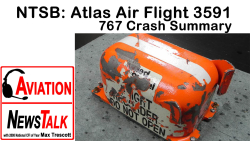 Last week, the NTSB held a 4-hour meeting about the crash of an Atlas Air 767 that crashed into a Bay near Houston last year. Amazingly everything was going fine until both pilots started making errors, and in just 30 seconds they plunged from 6,000 feet into the Bay. In episode #156 of my Aviation News Talk podcast, I played clips from the meeting most relevant for General Aviation Pilots, and at the end I gave five takeaways that all GA pilots can learn from this accident. I've just posted a YouTube version of that episode, which lets you see the graphics shown during presentations at the NTSB Board meeting, and you can see the Board members as they pose questions to the NTSB staff. Here's a brief overview.
 On February 23rd, 2019 at 1239 CDT, Atlas Air flight 3591, a Boeing 767-375 converted freighter, N1217A, entered a rapid descent from about 6,300 feet and impacted a marshy area about 41 miles Southeast of the George Bush Intercontinental airport in Houston, Texas. The two pilots and one non-revenue seat pilot were fatally injured.
The airplane was destroyed and highly fragmented. The airplane was on a scheduled flight from Miami, Florida to Houston. And as the airplane approached the Southeast coast of Texas, there was a small area of convective weather along the route of flight. The First Officer was the pilot flying, and the crew discussed a deviation around the weather to the West. During the same timeframe, the First Officer had a display issue of some kind and temporarily transferred control to the Captain, until he cleared the problem using the EFI or Effie switch, which selects source information for the electronic displays. The airplane was on a westerly vector around the weather, and ATC instructed the crew to expedite decent due to departure traffic.
At 12:38, the airplane was descending on autopilot with speed brakes extended, to assist in expediting the descent to 3000 feet. Standard procedures recommend the pilot flying should be guarding the speed brake handle to prepare for retraction at level off. This positions the First Officer's arm in close proximity to the go around switch, mounted on the left thrust lever. The NTSB believes that during the descent, as the aircraft hit turbulence, the First Officer inadvertently hit the go around switch. Normally, this mistake would be benign, and the pilots would correct the error. However, in this case, both pilots failed to follow standard operating procedures, and both were operating their controls–while the autopilot was still on–and their actions led to the loss of the aircraft.
A significant factor was somatogravic illusion, which occurs whenever a person is accelerated, which led the pilots to feel as if they were in a nearly straight up climb, when in fact they were almost level. I'll be talking more about somatogravic illusion in a future episode.
Also, if I can ask a small favor, please click here to subscribe to my YouTube channel, so you'll be notified when I release new videos and yes, it's Free. Also, you'll be notified whenever I give a Live presentation on YouTube.If you're unfamiliar with how to listen to podcasts, the easiest way to do it is to download one of our dedicated apps for your phone. Just go to the Apple App Store or the Google Play Store, and search for "Aviation News Talk." Or, click here for the dedicated app for iOS and dedicated app for Android. And podcasts are free, so they'll never cost you anything!And if you do find value in the show and would like to support it with a small contribution of a few dollars a month, you can do that with a credit card via Patreon, where you’ll also read about the goodies we’ll give you at various contribution levels. Or you can make a one-time donation or a monthly donation via PayPal.
And please tell all of your aviation friends about the show!